XE for Ledger
Sign XE payments on your Ledger. Every detail shows on the device’s screen before you approve.
For Nano S Plus, Stax, Flex and Nano Gen5. Not the Nano X yet.
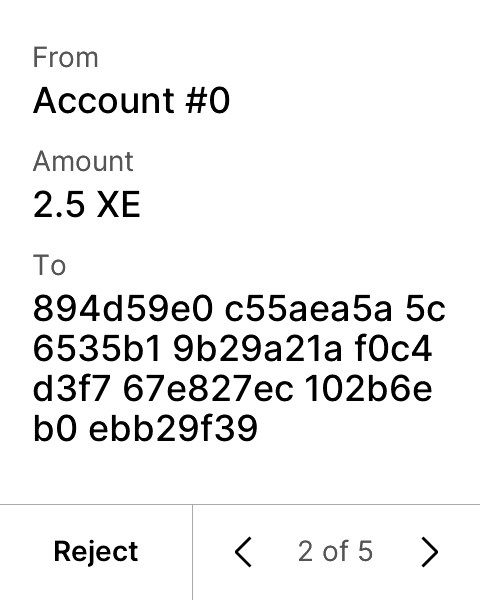
Try it right here
Pick your Ledger and a request, then page through it the way you would on the device.
Loading…
The key never leaves the device
- You see what you signThe full address and the amount, page by page, on the Ledger itself.
- Sign-ins say soA sign-in reads “Not a payment”, so you always know which is which.
- AI agents, within limits you seeConnecting an agent shows its spending limits on the device before you approve.
- Check what you installEvery install file has a code to compare, and the device shows the app’s ID.
Install the XE app yourself
It isn’t in Ledger Wallet (formerly Ledger Live) yet, so you add it with Ledger’s own tool. About ten minutes. Your recovery phrase is never needed.
- Version
- 0.3.1, built 2026-10-13
- Needs
- Up-to-date firmware: Nano S Plus 1.7.0, Stax 1.11.0, Flex 1.7.0, Nano Gen5 1.2.0 or later
Only install files from ledger.xe.marketized.io, on a Ledger that holds nothing valuable.
The Nano X only takes apps from Ledger Wallet, so it can’t install this one yet.
- 01Get the device ready
Update it in Ledger Wallet, then close Ledger Wallet. Plug the device in, unlock it and stay on its home screen.
- 02Install Ledger’s tool
In Terminal. Needs Python 3 from python.org.
Commandpython3 -m venv xe-ledger source xe-ledger/bin/activate pip install ledgerblue - 03Download the install file for the Nano S PlusCommand
curl -O https://ledger.xe.marketized.io/releases/0.3.1/nanosplus/app-xe.apdu - 04Check it
This command must print the hash below it. If it does not, delete the file.
Commandshasum -a 256 app-xe.apdue00f297b0c31b4cfbc2b6d14bbe99282122f0d21ed1845657ef8a868648076f6 - 05InstallCommand
python -m ledgerblue.runScript --targetId 0x33100004 --fileName app-xe.apdu --apdu --scpThe device asks you to allow a manager it calls not genuine. That warning is expected for an app from outside Ledger Wallet. Then it shows the app’s identifier. It must be this, or reject:
48d3d39a7c73ef5de6c5ecf1243c3ddf3cd99b877f8dc6001cb61e0795f7d1a3Confirm and enter your PIN.
- 06Use it
Open XE on the device. In Chrome or Edge, go to wallet.xe.marketized.io, choose Ledger, then Connect over USB.
Remove it
In the terminal from step 2, with the device unlocked on its home screen. Your keys are not affected: installing again brings the same accounts back.
python -m ledgerblue.deleteApp --targetId 0x33100004 --appName XECheck the download
A matching code means you have the exact file this site published. Ledger’s tools call the Nano Gen5 “Apex P”.
- Every file and its codeFor scripts.Address
https://ledger.xe.marketized.io/releases/manifest.json - If the install stops5515: unlock the device. 6d00 or 6e00: go back to its home screen. 511f: update it in Ledger Wallet. 6a84 or 6a85: remove an app to make room. 6985: you said no on the device; run it again.
Questions
Do I type my recovery phrase anywhere?
No. Installing never asks for it. Never type a Ledger’s phrase into a website or another wallet.
Why does my Ledger say “not genuine”?
Because Ledger hasn’t reviewed this app yet. That’s expected for an app you install yourself. Check that the app ID on the device matches the one in the steps.
Is it in Ledger Wallet?
Not yet. For now you install it yourself, with the steps above.
Is it free?
Yes. Sending XE has no fees either.
Can I use my everyday Ledger?
Use one that holds nothing valuable while the app is in testing and installed by hand.
XE apps run on XE Sim and the XE testnet. Test XE has no value. Ledger and the [L] mark are trademarks of Ledger SAS. This site is not run or endorsed by Ledger.
Put XE on your Ledger
For the Nano S Plus, Stax, Flex and Nano Gen5. About ten minutes with Ledger’s own tool.